

Description
Download Name Mangler 3 – Fast Batch File Renamer for Windows & macOS
Name Mangler 3 is a powerful yet intuitive batch‑renaming utility designed for users who need to rename large groups of files quickly and securely. Whether you’re a photographer organizing thousands of images, a developer refactoring code files, or a casual user cleaning up a download folder, Name Mangler 3 offers a flexible rule‑based engine that handles simple renames and complex pattern‑matching with equal ease. The application supports a wide range of naming conventions, including sequential numbering, case conversion, metadata extraction, and custom regular‑expression patterns. In addition, you can save frequently used renaming tasks as reusable presets, making repetitive work a matter of a single click. Built with a clean macOS‑styled interface and native Windows support, Name Mangler 3 feels right at home on both platforms while keeping the learning curve shallow for beginners. Security‑focused developers have also appreciated its sandboxed processing, ensuring that original files are never overwritten without explicit confirmation. Overall, Name Mangler 3 stands out as a reliable, feature‑rich tool that balances power and simplicity, making bulk file renaming a stress‑free experience.
Key Features & Functionality
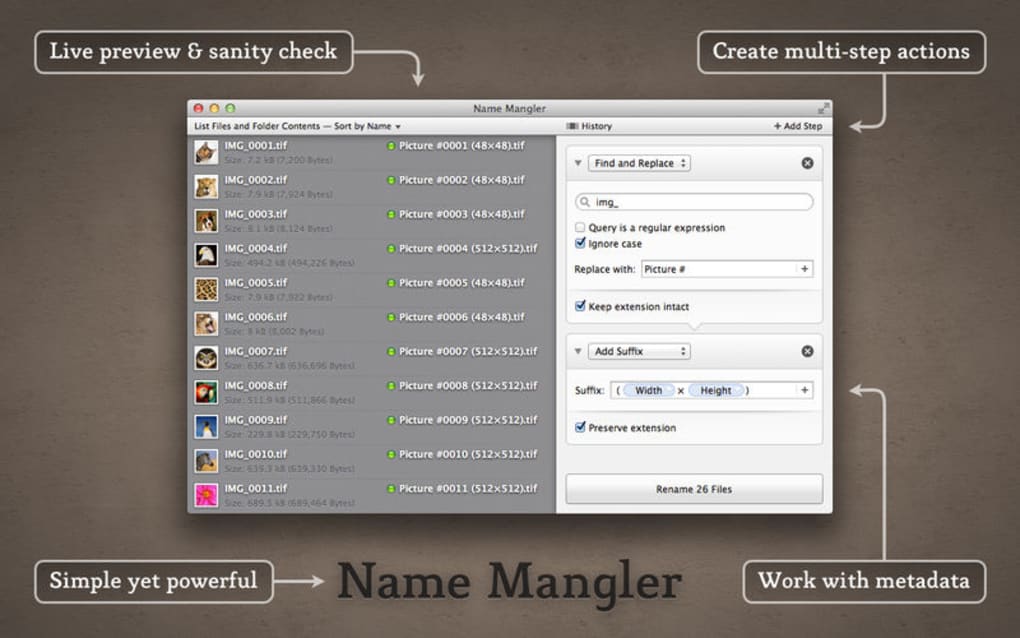
- Live preview of rename results before committing changes.
- Support for sequential numbering, date‑based naming, and case conversion.
- Advanced pattern matching with regular expressions.
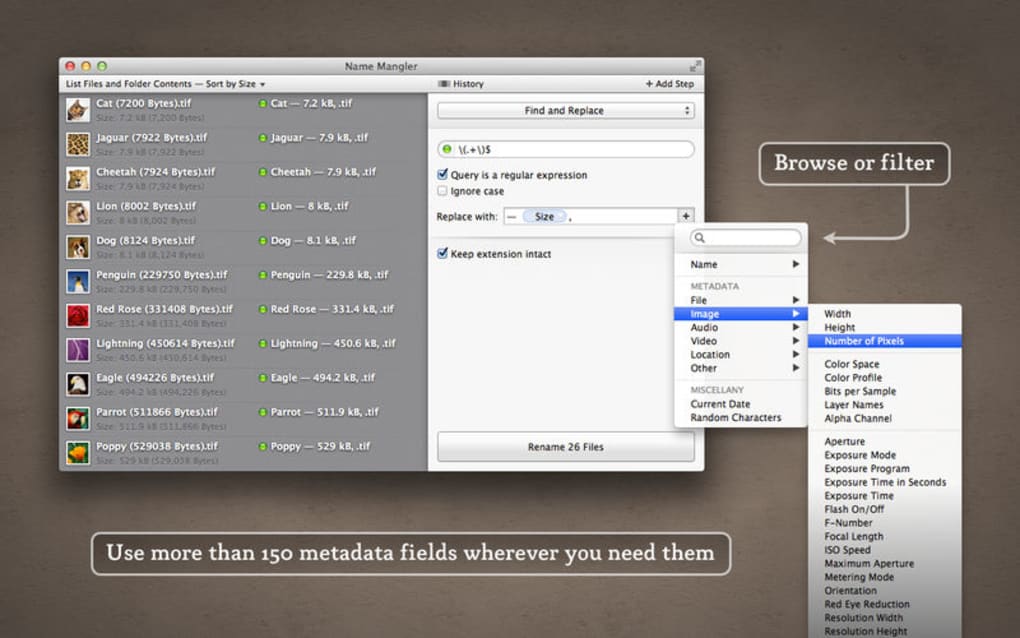
- Metadata‑driven renaming for photos, audio, and video files.
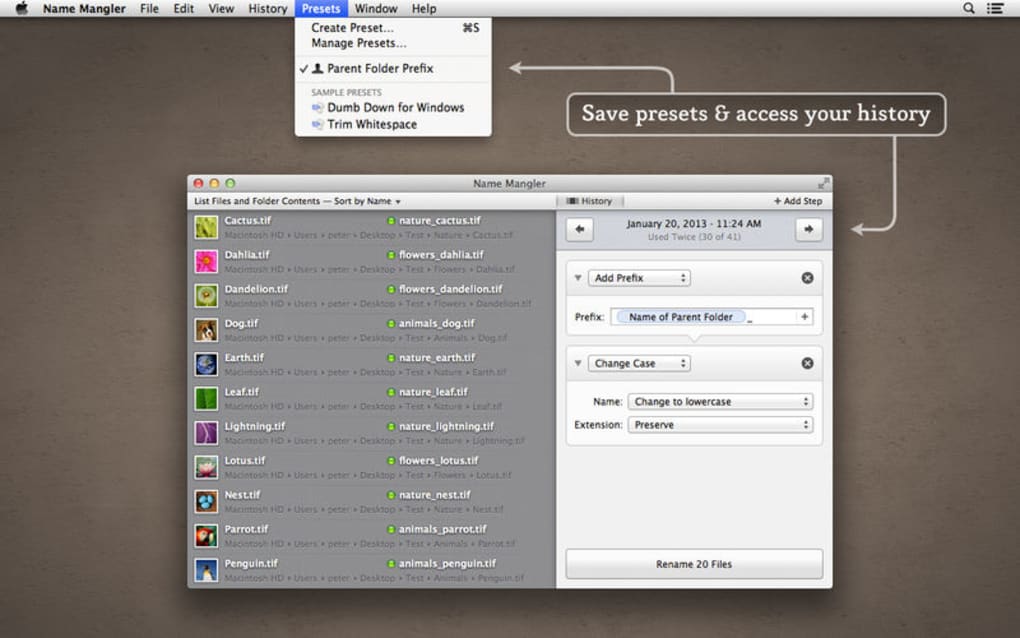
- Saved rename presets for instant reuse of complex workflows.
- Undo functionality that restores original filenames instantly.
- Drag‑and‑drop file selection and folder monitoring for real‑time renames.
- Multi‑language interface with full Unicode support.
- Secure processing that never modifies files without user approval.
- Integration with Finder (macOS) and Explorer (Windows) context menus.
Installation, Usage & Compatibility
Getting Name Mangler 3 up and running is straightforward on both Windows and macOS. For Windows users, download the .exe installer from the official website, run it, and follow the on‑screen prompts—accept the license agreement, choose an installation folder (the default works for most), and let the installer handle required .NET dependencies automatically. macOS users can download the .dmg package, open it, and drag the Name Mangler 3 icon into the Applications folder. The app is notarized by Apple, so macOS Gatekeeper will allow it to run without extra configuration.
Once installed, launch the application and you’ll be greeted by a clean three‑pane layout: the left pane displays the file list, the middle pane shows the renaming rules you build, and the right pane offers a live preview. Adding files is as simple as dragging them into the window or using the “Add Files” button. To create a rename rule, click the “+” icon and select from the built‑in actions—such as “Add Prefix,” “Replace Text,” or “Extract EXIF Date.” Each action can be reordered by dragging, allowing you to build complex pipelines without writing a single line of code.
When you’re satisfied with the preview, press the “Rename” button. Name Mangler 3 will ask for confirmation, then execute the changes atomically—if any error occurs, it rolls back to the original state, preserving data integrity. The application also supports batch processing of entire folders, and you can enable the “Watch Folder” option to automatically apply a saved preset whenever new files appear.
Name Mangler 3 runs natively on macOS 12+ (Monterey and later) and Windows 10/11 (64‑bit). It requires a minimum of 2 GB RAM and 50 MB of disk space. The software is optimized for both Intel and Apple Silicon processors, delivering smooth performance even when handling tens of thousands of files.
Pros, Cons, FAQ & Conclusion
Pros
- Intuitive UI that shortens the learning curve for beginners.
- Powerful rule engine supports both simple and complex renames.
- Live preview eliminates guesswork and prevents accidental data loss.
- Saved presets boost productivity for recurring tasks.
- Cross‑platform support for Windows and macOS.
Cons
- Advanced regular‑expression features may be intimidating for non‑technical users.
- No native Linux version (requires Wine or similar).
- Free trial limits the number of simultaneous rename operations.
Frequently Asked Questions
Can I undo a rename operation if I make a mistake?
Yes. Name Mangler 3 includes an “Undo” button that restores the original filenames instantly, provided you haven’t closed the application.
Is Name Mangler 3 safe for my original files?
Absolutely. The software works on a copy‑on‑write basis and asks for confirmation before any changes are applied. No data is overwritten without explicit user approval.
Can I rename files based on EXIF metadata?
Yes. One of the built‑in actions extracts EXIF dates, camera model, or other metadata, allowing you to create meaningful photo naming schemes automatically.
Does Name Mangler 3 support batch renaming of subfolders?
The tool can process files inside subfolders when you enable the “Include Subfolders” option in the file selection dialog.
What is the price of the full version?
Name Mangler 3 offers a one‑time purchase license for $29.99 USD, which includes all future updates and a lifetime support guarantee.
Conclusion & Call to Action
In a world where digital assets multiply at an ever‑increasing pace, a reliable batch‑renaming tool is no longer a luxury—it’s a necessity. Name Mangler 3 delivers precisely what power users and casual enthusiasts need: a fast, secure, and highly configurable solution that works seamlessly on both Windows and macOS. Its live preview, undo capability, and saved presets ensure you never lose control over your files, while advanced features like regular‑expression support and metadata extraction keep you productive even on the most demanding projects.
If you’re looking to streamline your workflow, reduce manual errors, and keep your file system organized, there’s no better choice than Name Mangler 3. Download the free trial today, explore the intuitive interface, and experience how a few clicks can transform hours of tedious renaming into a matter of seconds. When you’re ready, upgrade to the full version and enjoy unlimited renaming power for a one‑time price.
Guides & Tutorials for Name Mangler 3
How to install Name Mangler 3
- Click the Preview / Download button above.
- Once redirected, accept the terms and click Install.
- Wait for the Name Mangler 3 download to finish on your device.
How to use Name Mangler 3
This software is primarily used for its core features described above. Open the app after installation to explore its capabilities.
User Reviews for Name Mangler 3 0
No reviews found





.webp)